Claude Code: getting notified when a session blocks, using hooks
Claude already notifies you when it needs attention — but the default notification fades in a few seconds. Run three sessions across three tasks and you'll miss the one that blocked. A hook fires a deterministic, persistent alert that names the branch and project, so the stuck session can't hide.
When I’m working I usually have several Claude Code sessions open at once — one refactoring a service, one writing tests, one chasing a bug — each in its own terminal, each on its own branch. They run unattended while I do something else, and every so often one of them blocks: a permission prompt, or it finishes and waits for my next instruction.
Claude does tell you when that happens — it pops a desktop notification. The problem is that the default notification fades after a few seconds. If I’m heads-down in another window when it fires, I miss it, and that session just sits there idle. With one session you’d notice eventually. With three or four across different tasks, “eventually” turns into ten wasted minutes on the session you forgot was waiting.
I fixed this with a hook: a persistent, can’t-miss notification that names the branch and project, so the moment any session needs me I know which one. This post is mostly about that one example — hooks in general get a light pass.
Hooks, in one paragraph
A hook is a shell command the harness runs at a fixed point in a session, configured in settings.json. The key word is deterministic: it’s the runtime that runs it, not the model, so it fires every single time the event happens — no chance Claude “forgets” or decides it isn’t necessary. That’s the whole appeal. There are events for before/after a tool runs, when you submit a prompt, when Claude stops, when a session starts or ends — but the one I care about here is Notification, which fires exactly when Claude needs your attention.
The hook
This lives in ~/.claude/settings.json (user level, so every project gets it):
{
  "hooks": {
    "Notification": [
      {
        "matcher": "",
        "hooks": [
          {
            "type": "command",
            "command": "RAMA=$(git -C \"${CLAUDE_PROJECT_DIR:-$PWD}\" rev-parse --abbrev-ref HEAD 2>/dev/null || echo '(no branch)'); PROYECTO=$(basename \"$PWD\"); notify-send -u critical \"⚠️ CLAUDE NEEDS YOUR ATTENTION ⚠️\" \"\n\n\n👤 Hi $USER,\n\nBranch 🌿 $RAMA requires your attention.\n\nProject: 📁 $PROYECTO\n\nCheck the terminal 🤖\n\n\n\""
          }
        ]
      }
    ]
  }
}
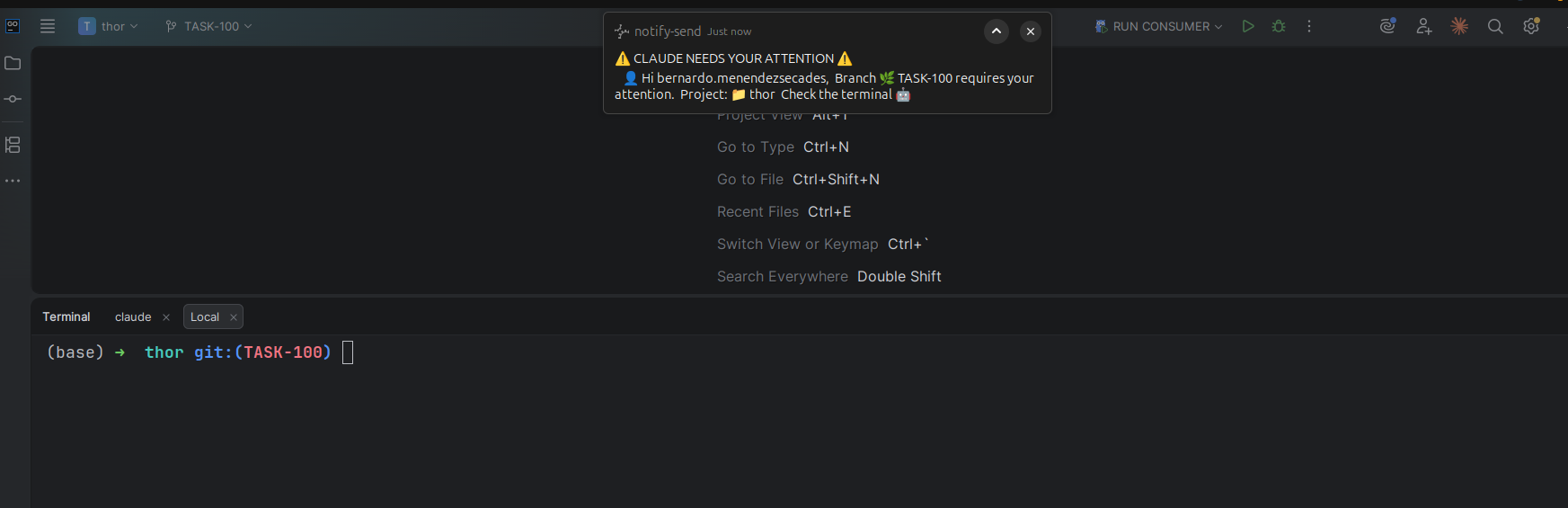
And here’s what lands on screen — a critical, sticky desktop notification, on top of whatever I’m doing, the instant a session blocks:
The two things that make it work for the multi-session case:
- It’s persistent.
-u criticalis the one flag that matters: by the freedesktop spec, the desktop daemon never auto-expires critical notifications, so they wait until I dismiss them — unlike the default that fades in seconds. No timeout flag is needed; critical urgency alone keeps it on screen. - It names the session.
RAMAreads the current branch andPROYECTOthe project folder, interpolated into the body. When five terminals are running, the alert tells me which one needs me without checking each.CLAUDE_PROJECT_DIRis an env var the harness exports into every hook, pointing at the project root;:-$PWDis the fallback, and|| echo '(no branch)'keeps it from erroring outside a git repo.
matcher: "" just means “fire on every notification” — Notification doesn’t subdivide by tool, so empty is the normal case.
Drop the block in, save, and start a new session — the harness picks up hook changes at session start, so an in-flight session won’t see the edit until you restart it. On macOS, swap the command for osascript -e 'display notification "Body" with title "Title" sound name "Glass"'; the hook structure is identical.
Impact
- The dead-time between “a session blocked” and “I noticed” dropped from minutes to seconds — and stays that way no matter how long I’m looking elsewhere, because the alert doesn’t fade.
- Running three or four sessions across different tasks became actually practical. The branch + project line means I jump straight to the right terminal instead of cycling through all of them.
- I stopped watching terminals entirely. The deterministic guarantee — it fires every time — is what lets me trust that and fully context-switch away.
Technical decisions
- A hook, not a habit. Glancing at the terminal is a pull that fails the moment you’re absorbed elsewhere. A hook is a push, and because the harness runs it deterministically it never silently skips.
-u criticaland nothing else. Critical urgency is the only thing the spec guarantees won’t auto-expire, and it’s enough on its own — I dropped the-t 0timeout flag because it’s redundant (and at normal urgency common daemons like GNOME Shell ignore it anyway). One flag does the whole job.- Branch + project in the body. Without them the alert is useless when juggling sessions — “Claude needs attention” but which one?. The two
$(...)reads are the whole reason the hook scales past one terminal. - User-level, not project-level. It’s personal ergonomics, not something teammates should inherit, so it lives in
~/.claude/settings.jsonrather than the repo’s committed settings.
Real limitations
notify-sendis Linux-only. The hook structure is portable but the command isn’t — macOS needsosascript, and a headless box (CI, SSH without a display) has no desktop to notify at all.- It won’t tell you why a session stopped.
Notificationfires for both a permission prompt and an idle wait; the alert says “needs attention”, not “wants to runrm”. It gets you to the right terminal fast — you still read it to act. - Session-start pickup. Editing the hook won’t affect a session already running; you restart to load changes.
- Fire-and-forget. A
Notificationhook only observes and alerts — it can’t block or change what Claude does. Shaping behaviour is what the other events (PreToolUseand friends) are for.
Hooks are the deterministic layer underneath an otherwise probabilistic assistant. This one is the gentlest place to start: it changes nothing about how Claude works, and it buys back every minute you used to lose to a session quietly waiting on a notification you never saw.